> For the complete documentation index, see [llms.txt](https://calidocu.gitbook.io/caliverse-metaverse/llms.txt). Markdown versions of documentation pages are available by appending `.md` to page URLs; this page is available as [Markdown](https://calidocu.gitbook.io/caliverse-metaverse/en/pass-and-claim/season-pass.md).

# Season Pass

1. **What is the Season Pass?**

The Season Pass allows you to earn points by playing in the metaverse (completing quests), which upgrade your rank and receive reward items assigned to each rank.

&#x20;

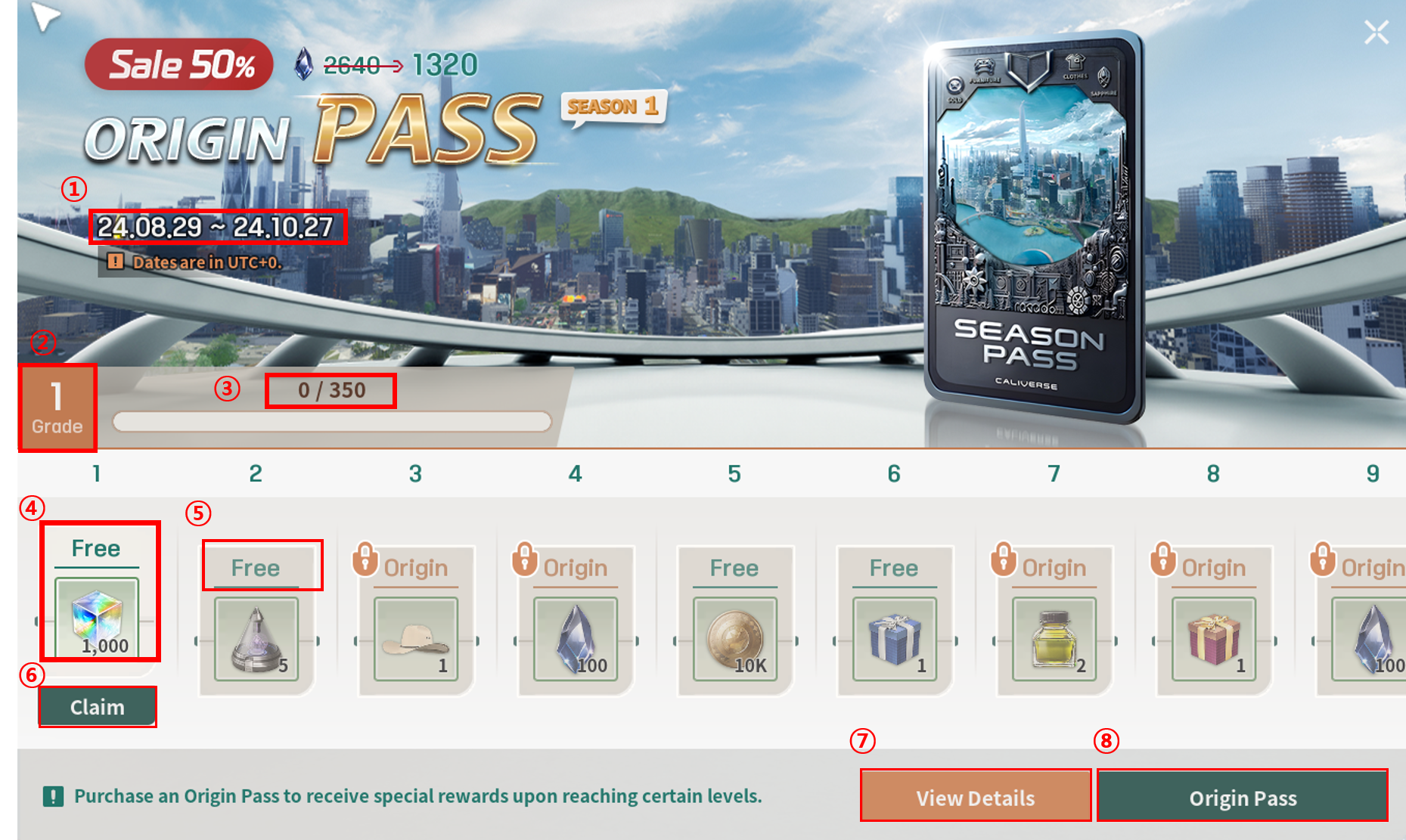
**\[Pass Structure]**

<figure><img src="https://content.gitbook.com/content/DvNN0pfqiNtlyUEC0BTw/blobs/VPDHsKW8KimjE6Zk8Hfe/seasonpass2.png" alt=""><figcaption></figcaption></figure>

<table><thead><tr><th width="84" align="center">No.</th><th>Content</th></tr></thead><tbody><tr><td align="center"><strong>1</strong></td><td>Indicates the period during which you can earn rewards for each season.</td></tr><tr><td align="center"><strong>2</strong></td><td>Your rank will automatically upgrade as you accumulate points.</td></tr><tr><td align="center"><strong>3</strong></td><td>Players can earn points by completing system quests and UGQs.</td></tr><tr><td align="center"><strong>4</strong></td><td>The Free Pass allows you to claim rewards for free as you reach each rank.</td></tr><tr><td align="center"><strong>5</strong></td><td>The Season Pass can be purchased with Sapphire, allowing you to claim exclusive rewards not available with the Free Pass.</td></tr><tr><td align="center"><strong>6</strong></td><td>Rewards can be claimed upon reaching each rank.</td></tr><tr><td align="center"><strong>7</strong></td><td>Provides access to the detailed CALIVERSE guide.</td></tr><tr><td align="center"><strong>8</strong></td><td>This is the payment window where you can purchase the Season Pass.</td></tr></tbody></table>

TIP: Use the mouse wheel to view more rewards!

2. **How to Check the Season Pass**

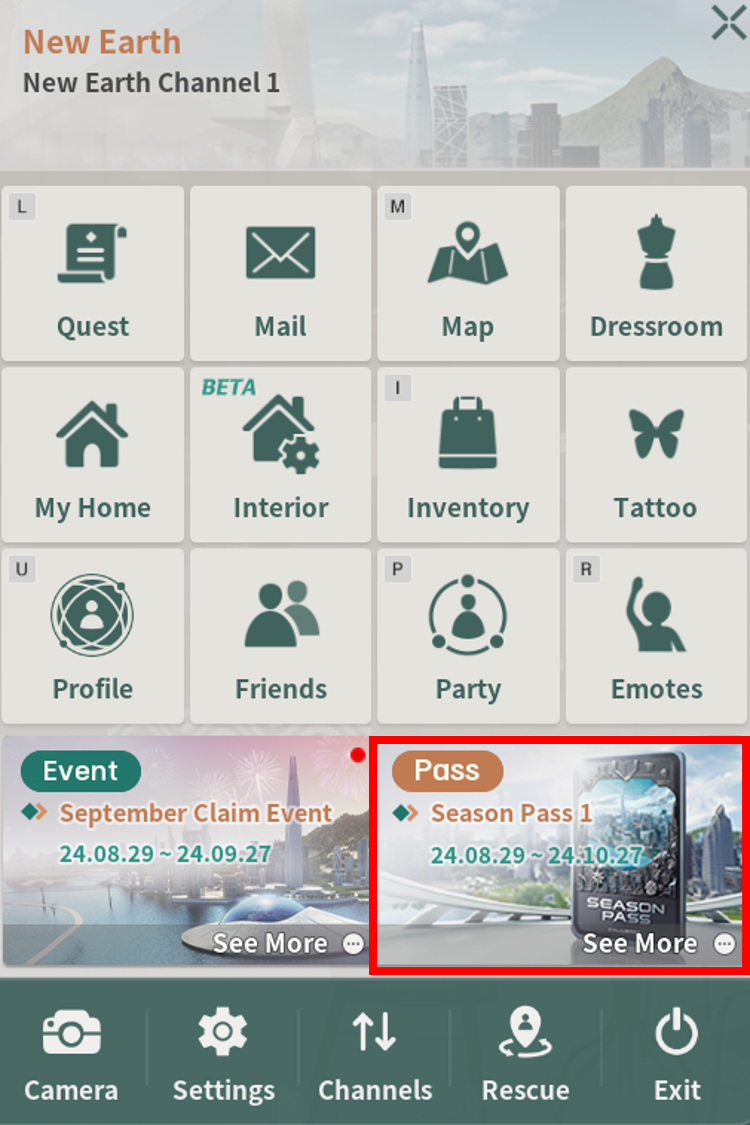
2-1. Click the \[ESC] button, then select \[Season Pass 1].

<figure><img src="https://content.gitbook.com/content/DvNN0pfqiNtlyUEC0BTw/blobs/Oxsk0ds0DeF1UayWTIYa/seasonpass1.png" alt=""><figcaption></figcaption></figure>

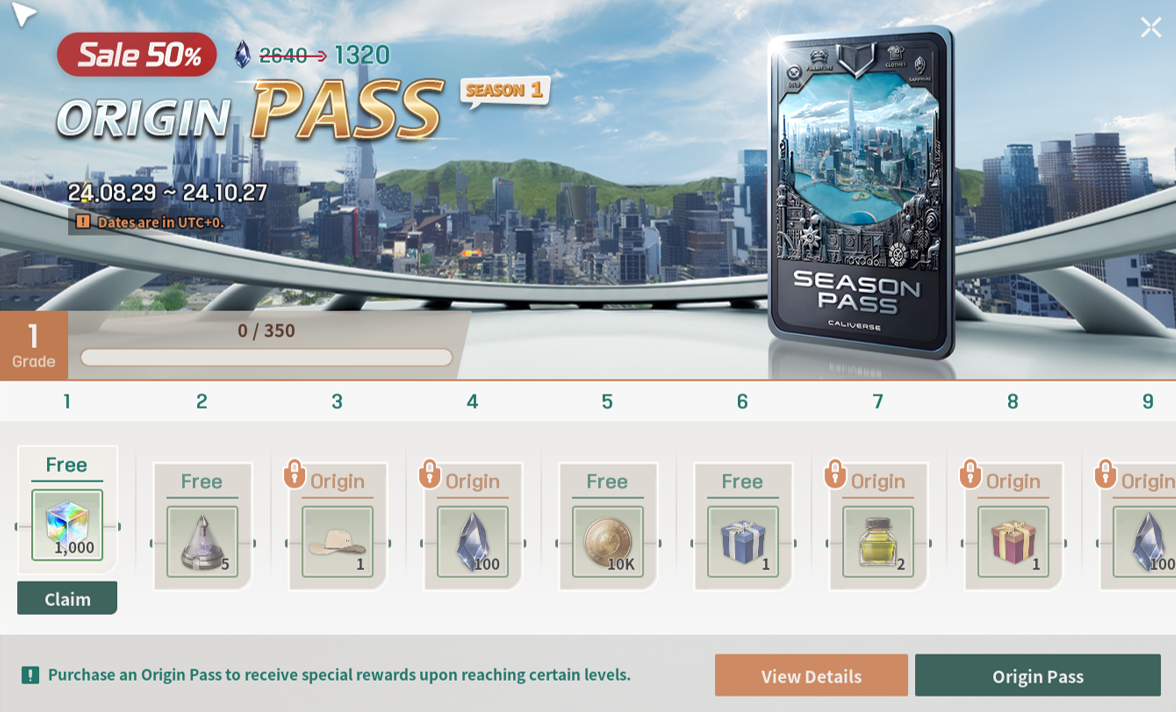
2-2. Check your Season Pass!

{% hint style="info" %}
**Important! The Season Pass operates on a seasonal basis, and once the specified period ends, you will no longer be able to claim rewards. Please make sure to claim your rewards within the time limit.**
{% endhint %}

<figure><img src="https://content.gitbook.com/content/DvNN0pfqiNtlyUEC0BTw/blobs/BoZmtOinc9sotpOS6ZuA/seasonpass5.png" alt=""><figcaption></figcaption></figure>

3. **How to Obtain the Season Pass**

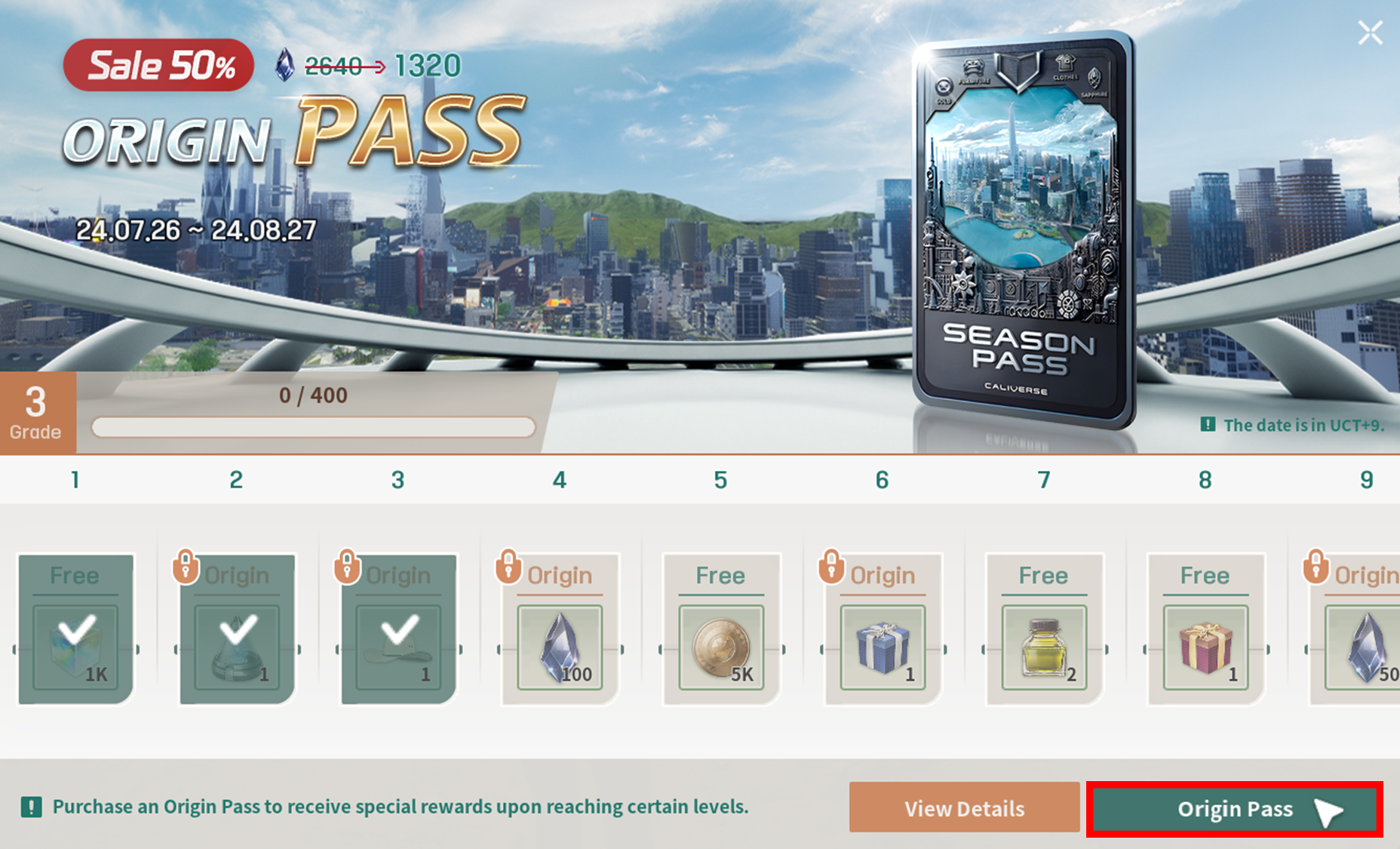
3-1. In the Season Pass tab, click on \[Origin Pass].

<figure><img src="https://content.gitbook.com/content/DvNN0pfqiNtlyUEC0BTw/blobs/bZVdrpo0pIH3hs1eQ3tI/4.png" alt=""><figcaption></figcaption></figure>

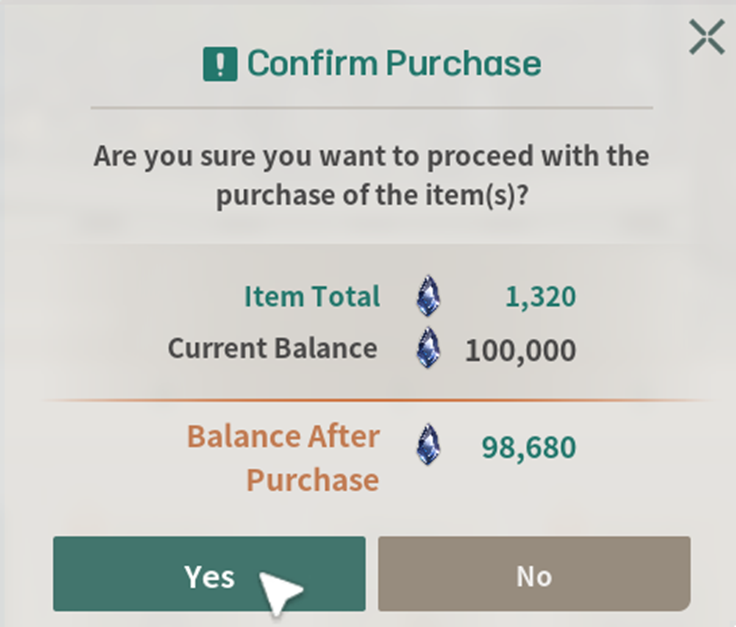
3-2. After confirming the Item total amount, click the \[Yes] button.

<figure><img src="https://content.gitbook.com/content/DvNN0pfqiNtlyUEC0BTw/blobs/5gKOTdfhGSZJAk2LfnzJ/5.png" alt=""><figcaption></figcaption></figure>

3-3. Completed!

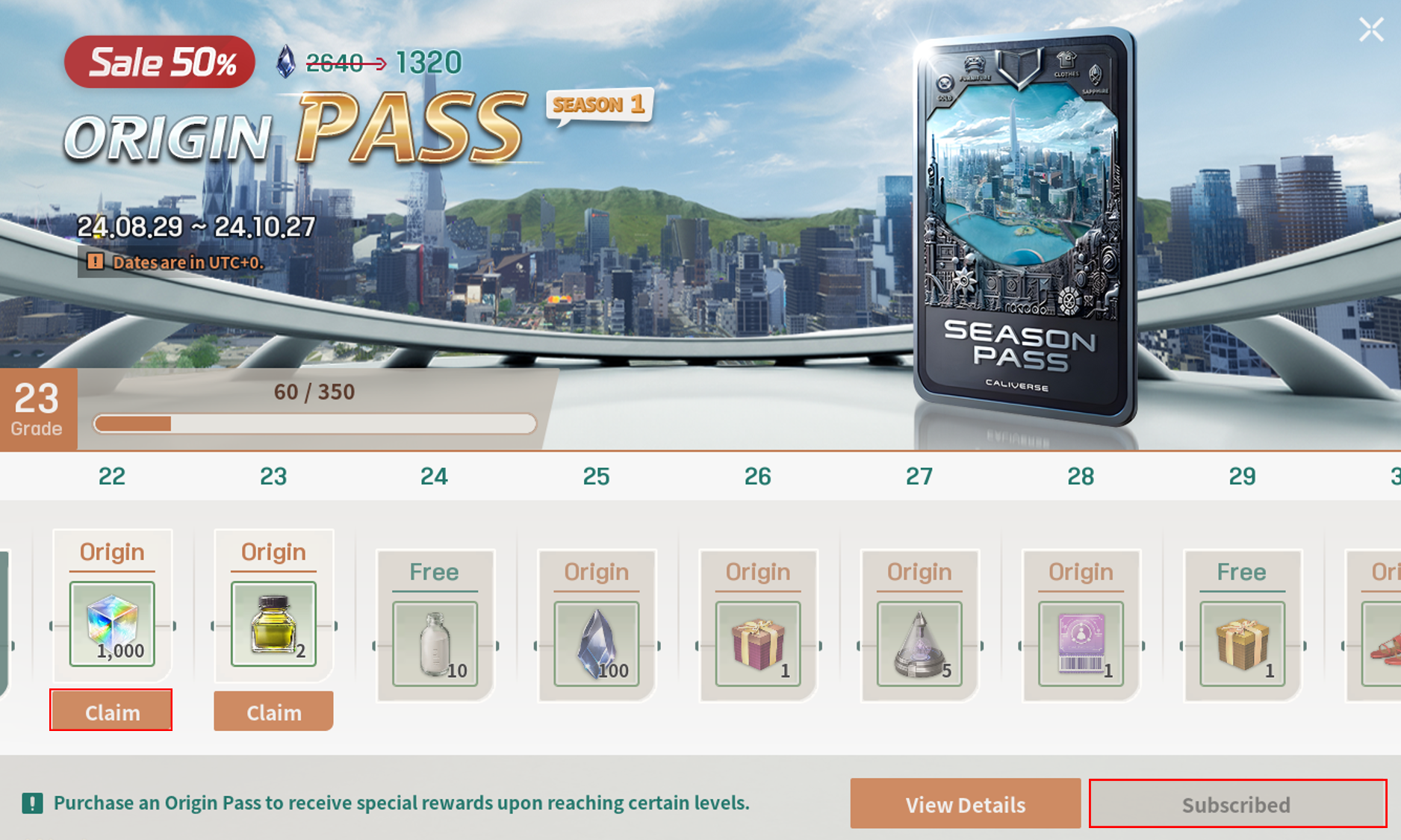
* Your status will change to \[Subscribed], and the Season Pass will be unlocked!&#x20;
* Click the Claim button to collect your rewards within the period!

<figure><img src="https://content.gitbook.com/content/DvNN0pfqiNtlyUEC0BTw/blobs/6v2331vlvtFznB3J8puU/%EC%8B%9C%EC%A6%8C%ED%8C%A8%EC%8A%A4.png" alt=""><figcaption></figcaption></figure>

**\[If you want to check Origin Pass items, please check through the link below!]**

[Origin Pass Season 1](/caliverse-metaverse/en/pass-and-claim/season-pass/origin-pass-season-1.md)

<mark style="color:red;">※ Please note that the amounts and figures mentioned in this guide may differ from those in the actual metaverse.</mark>