> For the complete documentation index, see [llms.txt](https://calidocu.gitbook.io/caliverse-metaverse/llms.txt). Markdown versions of documentation pages are available by appending `.md` to page URLs; this page is available as [Markdown](https://calidocu.gitbook.io/caliverse-metaverse/en/caliverse-feature-guide/contentbrowser.md).
# Content Browser
## Content Browser Guide
### 1. Feature Overview
The Content Browser allows you to conveniently explore various content such as Caliverse, Brand, TPS (Academy Combat Zone), and Race Mode (Jump Runner) all in one screen.\
You can instantly launch content or move directly to the corresponding area.
### 2. Main Menu
#### 2-1. How to Access
Press the **ESC key** to open the Main Menu.
#### 2-2. Layout
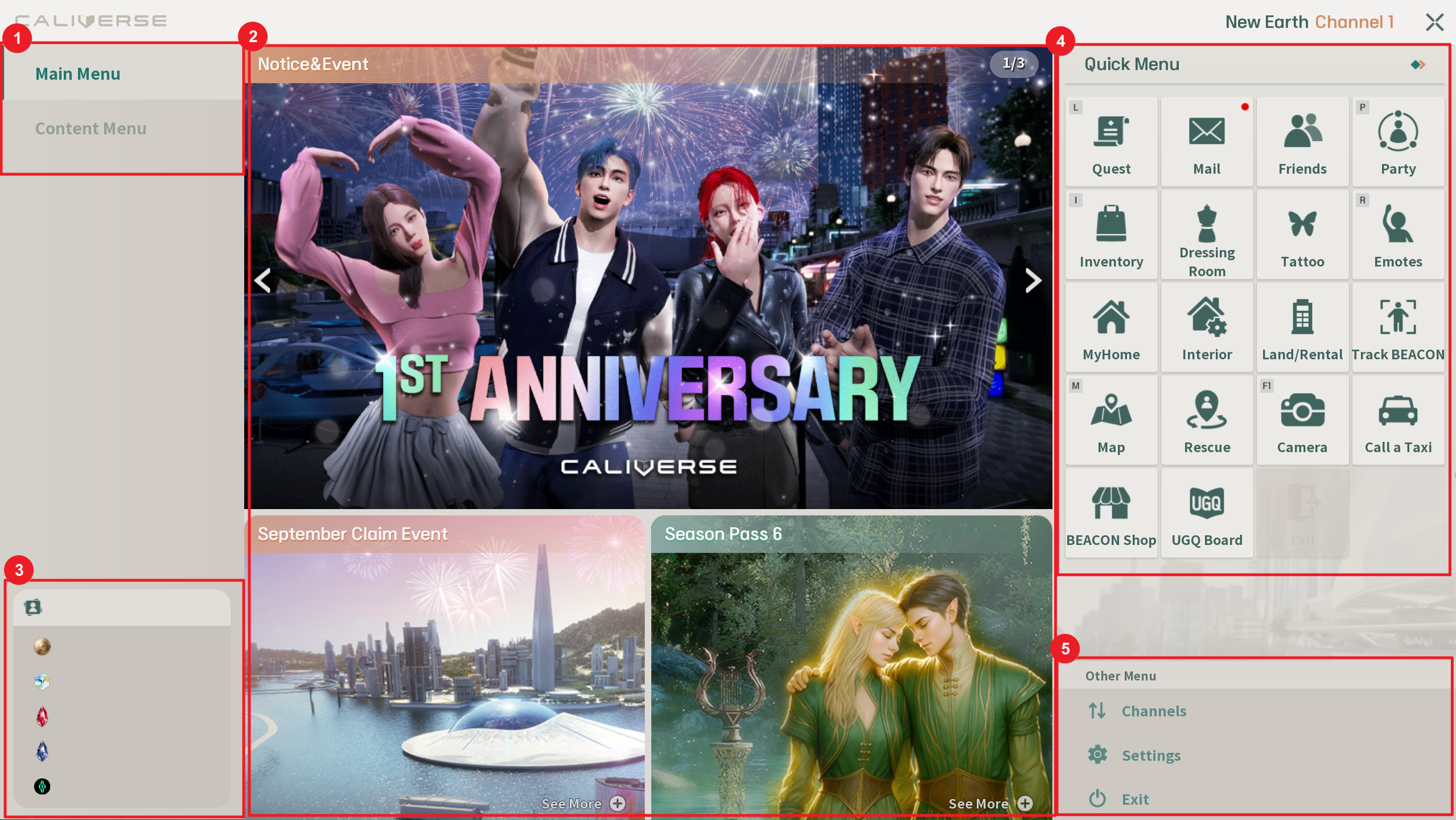
1. **Tab Switch**\
Switch between the Main Menu and the Content Menu from the tab in the top left corner.
2. **Central Banner Area**\
Provides major announcements such as events, updates, and season passes through image banners.\
Clicking a banner will take you to the related screen or webpage.
3. **User & Currency Information**\
Displays your logged-in avatar name and the currencies you own (Gold, Ruby, Sapphire, Calium, etc.).
4. **Quick Menu**\
Provides buttons for frequently used features such as Quest, Mail, Friends, Inventory, Dressing Room, and Emotes.
5. **Other Menu Options**\
Includes Channel Change, Settings, and Exit.
### 3. Quick Access Buttons
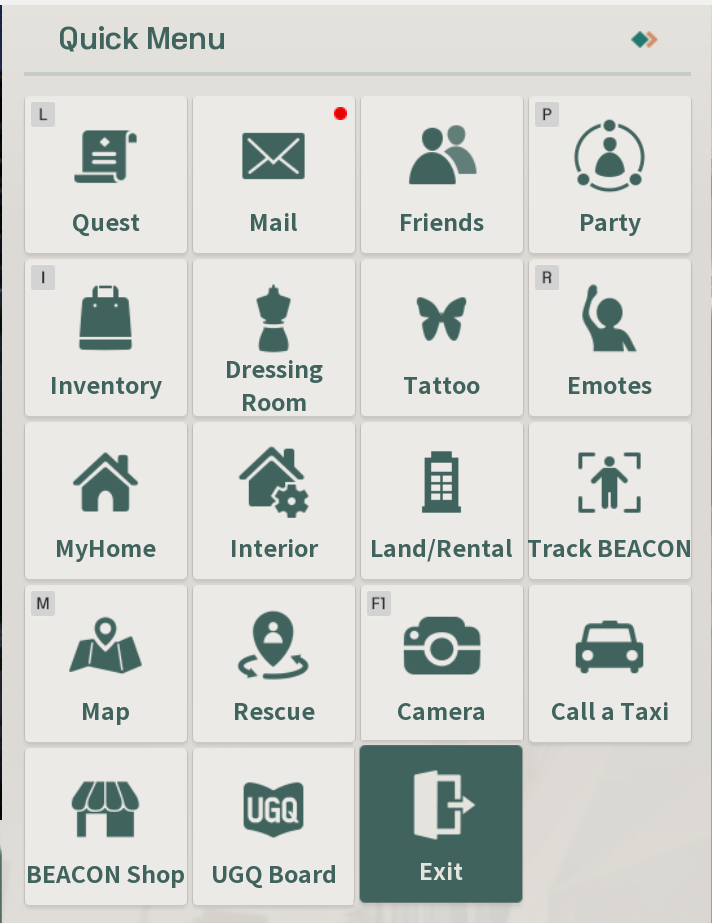
| Button Name | Description |
| ------------- | -------------------------------------------------------------------------------------------------------------------------------------------------------------------------------- |
| Quest | Check ongoing quests and receive rewards |
| Mail | View mailbox, read messages, and claim rewards |
| Friends | Manage friend list (add, remove, block) |
| Party | Create, invite, or disband a party |
| Inventory | Check and use items you currently own |
| Dressing Room | Change avatar outfits and save styles |
| Tattoo | Set avatar tattoos |
| Emotes | Perform avatar emotion expressions and actions |
| MyHome | Move to My Home |
| Interior | Change furniture and interior decorations |
| Land / Rental | Land auction, management, and leasing |
| Track BEACON | View information on owned BEACONs |
| Map | Open the map |
| Rescue | Reset avatar position and return to a safe area |
| Camera | Take screenshots and enter photo mode |
| Call a Taxi | Call a taxi and move to the destination |
| Beacon Shop | Open the Beacon Shop page |
| UGC Board | Open the UGC board |
| Exit | Instantly return to your previous location or the field when inside specific indoor areas (My Home, Farm, MCM, CP Lounge, Lotte Hi-Mart, Lotte Duty Free, Lotte Innovate, etc.). |
**Notes**
* ESC key: Closes the quick menu
* Some buttons may be disabled depending on your location or situation
* Quest (L), Party (P), Inventory (I), Emote (R), Map (M), and Photo Mode (F1) can be executed directly with shortcut keys
* The “Exit” function is only available in specific indoor areas
### 4. Other Menu Options
* **Channel Change:** Switch to a different channel
* **Settings:** Adjust graphics, sound, and other preferences
* **Exit:** Close the CALIVERSE client
### 5. Content Browser
#### 5-1. How to Access
Open the Main Menu with the ESC key, then select the Content Menu tab at the top.\
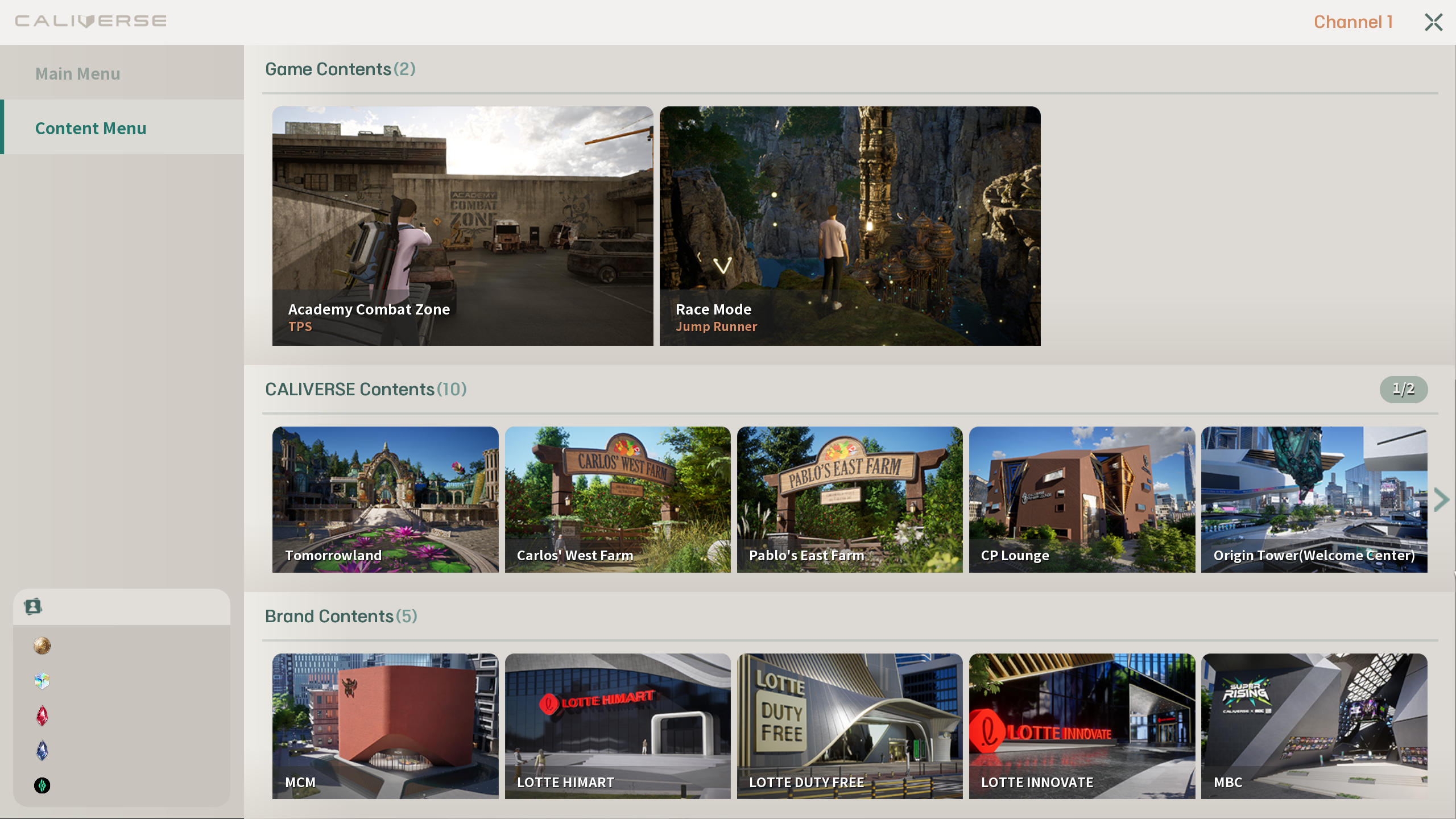
At the top of the screen, three categories will appear: **Game / Caliverse / Brand**
#### 5-2. Main Layout
| Category | Description |
| ----------------- | ---------------------------------------------------- |
| Game Content | Start the game immediately by clicking a thumbnail |
| Caliverse Content | Move to the corresponding area after paying 500 Gold |
| Brand Content | Move to the corresponding area after paying 500 Gold |
### 6. Tips
* You can easily close the Content Menu with the ESC key
* If you own a Season Pass, the entry fee (Gold) for Caliverse and Brand content will be waived